Showing posts with label bare metal. Show all posts
For an IT enterprise sizing from few hundred's of computers to thousands, deploying operating system manually on each on of them is expensive and a time consuming process.In order to install OS on bare metal machines connected to network, Intel introduced PXE (Preboot eXecution Environment) as part of the Wired for Management framework by Intel.

Wired for Management (WfM) is a hardware-based system allowing a new computer without any software to be controlled by a master computer that could access the hard disk of the new PC to copy a program. Intel developed this system in 1990's.It can also be used for software updates and monitoring the machine remotely.

WfM included the Preboot Execution Environment (PXE) and Wake-on-LAN (WOL) standards.However WfM has now been replaced by the Intelligent Platform Management Interface standard.

The real problem for most IT managers was every time a new employee is hired, a machine in work-ready state is to be provided  to the employee for doing productive work.This problem can be solved by cloning a existing machine and deploying the cloned image onto the new computer.However this needs to be automated as there can be multiple configurations with different sets of software for different category of employees (eg: software needed by a developer may not be needed by a sales person).

Real Problem : getting thousands of machines into work ready state in minimum time.

Lets try to digest how pxe boot works ?
PXE was the solution to all the above problems. Its a set of protocols used to boot a machine (without an OS) from network.So if you have a machine connected to your enterprise network , OS can be installed on it remotely over the network.

PXE uses several network protocols like Internet Protocol (IP), User Datagram Protocol (UDP), Dynamic Host Configuration Protocol (DHCP) and Trivial File Transfer Protocol (TFTP).

"Boot from Network" or a similar setting is available in BIOS of every modern computer.


A PXE client can be a server, desktop, laptop or any other machine that is equipped with PXE boot code.Once the PXE client is enabled to boot from network ,on its next boot the system can now be controlled remotely.

Entire PXE Boot Process :


PXE Boot Process with Protocol Usage :
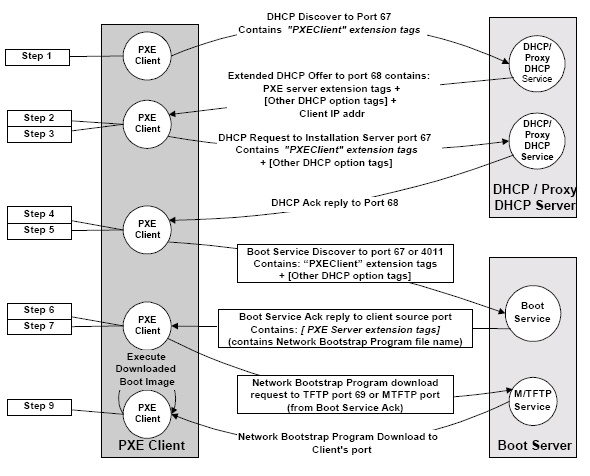
Source : Intel pxespec document

Related Article : iPXE for Wireless Networks

Booting from Network to provision bare metal computers

What is a bare metal machine ? What is bare metal hardware ?

The term bare metal machine is used to refer to a machine on which there is nothing reliable but the hardware.


The goal of a bare metal install is to take any piece of hardware and install a operating system on it so that it becomes fit for its business purposes.
Typical scenarios involving bare metal machines include:
  • Installation of an operating system on a new machine (out of the box)
  • Reinstallation of a damaged operating system from scratch
  • Recovery of a damaged operating system from a system backup
  • Repurposing of a machine (without regard to the previous operating system installed)
  • Clean migration to a new operating system (without dependency on the current state of the system)
Although some of these tasks (like repurposing or OS migration) could also be performed leveraging on a previously installed operating system, the bare metal approach is more reliable and leads to more homogeneous configurations: New machines and old machines should ideally always be installed using the exact same method.

Bare metal install

The goal of a bare metal install is to take any piece of hardware and install a operating system on it so that it becomes fit for its business purposes.
Factors that may be used to compare the quality of bare metal install processes include:
  • AutomationA good bare metal install process should require no manual intervention and run unattended from end to end. Less evoluted processes may require some manual intervention at the beginning or at end of the installation (to power on a machine, insert a boot CD, or to finalize some tasks for install).
  • IntegrationThe installation process should produce fully configured individual systems, completely integrated into the IT infrastructure. Less evoluted processes may require extra work by system engineers to customize every machine for a specific task.
  • Adaptability The installation process should automatically adapt to hardware variation and work regardless of the hardware model or vendor. Many tools are limited on that aspect.
  • Compatibility The installation process should offer maximal compatibility with the Operating System by leveraging vendor native installation methods or integrating with the OS vendor recommended installation tools. Some bare-metal installation tools use methods discouraged by OS vendors.
  • Scalability The same installation process should be usable for large-scale provisioning as well as for individual installations. This requires in particular the support of a multicast network protocol.
  • Speed The installation process should run as quickly as possible, leveraging on techniques such as cloning when possible. 

Bare metal recovery

The goal of bare metal recovery is to return a system to previous working state after a major failure that requires the reinstallation of the operating system, using a backup. This may have to be done either on the same hardware or on a replacement hardware.
Factors that may be used to compare the quality of bare metal restore processes include:
  • Automation A good bare metal restore process should require no manual intervention and run unattended from end to end. Less evoluted processes may require a separate reinstallation of the operating system, followed by a manual operation to trigger the restoration of backup data.
  • Reintegration Ideally the recovery process should ensure that the restored machine is again completely integrated into the IT infrastructure. Most recovery processes require extra work by system engineers to rejoin the system to its existing environment.
  • Adaptability The recovery process should automatically adapt to hardware variation in case the new machine is not of the exact same model or vendor. Many tools are limited on that aspect.
  • Precision The recovery process should produce a system that behaves exactly as the original system. In particular, performance of the recovered system should not be reduced, and all applications should continue to work. This may require a precise restoration of internal filesystem structures for instance.
  • Scalability The same recovery process should be usable for large-scale disaster recovery as well as for individual recovery. This requires in particular the support of a multicast network protocol.
  • Speed The recovery process should run as quickly as possible. 

Related Article : Booting from Network

    What are Bare Metal machines

    +